AEP & Google Part G: Publisher & Retail Media Destinations
Google Ad Manager (GAM)
To end this Google blog series, we will explore a more niche solution that is mostly used by publishers or organisations to monetise their content. Whilst your typical publishers were the exclusive users of a tool like Google Ad Manager (GAM), the landscape of advertising and commerce has witnessed a transformative shift. For example, retailers are joining the space to offer a cross-looped offering from awareness to conversion whether in-store or online. The Interactive Advertising Bureau has increasingly more blogs on the topic of Retail Media.
Advertisers, long challenged by the difficulty of connecting ad spending to actual customer purchases, are now embracing commerce/retail media. It is a dynamic approach that directly links audience impressions with omnichannel transactions and business outcomes. The adoption of a tool such as GAM is becoming more popular.
This evolution, driven by e-commerce growth, changing consumer expectations, and the impending removal of cookies from web browsers, is poised to redefine the way brands engage with customers.
In practice, GAM assists operationally in defining your ad inventory and creating, managing, and reporting on your advertising campaigns:
- Define ad inventory with ad units
- Get code tags from Ad Manager for each unit/location
- Insert tags on the webpage/app
- Tags request ads from Ad Manager
- Create orders and line items for advertisers
- Ad units become eligible for ad campaigns
- Ad Manager serves the best ad upon request
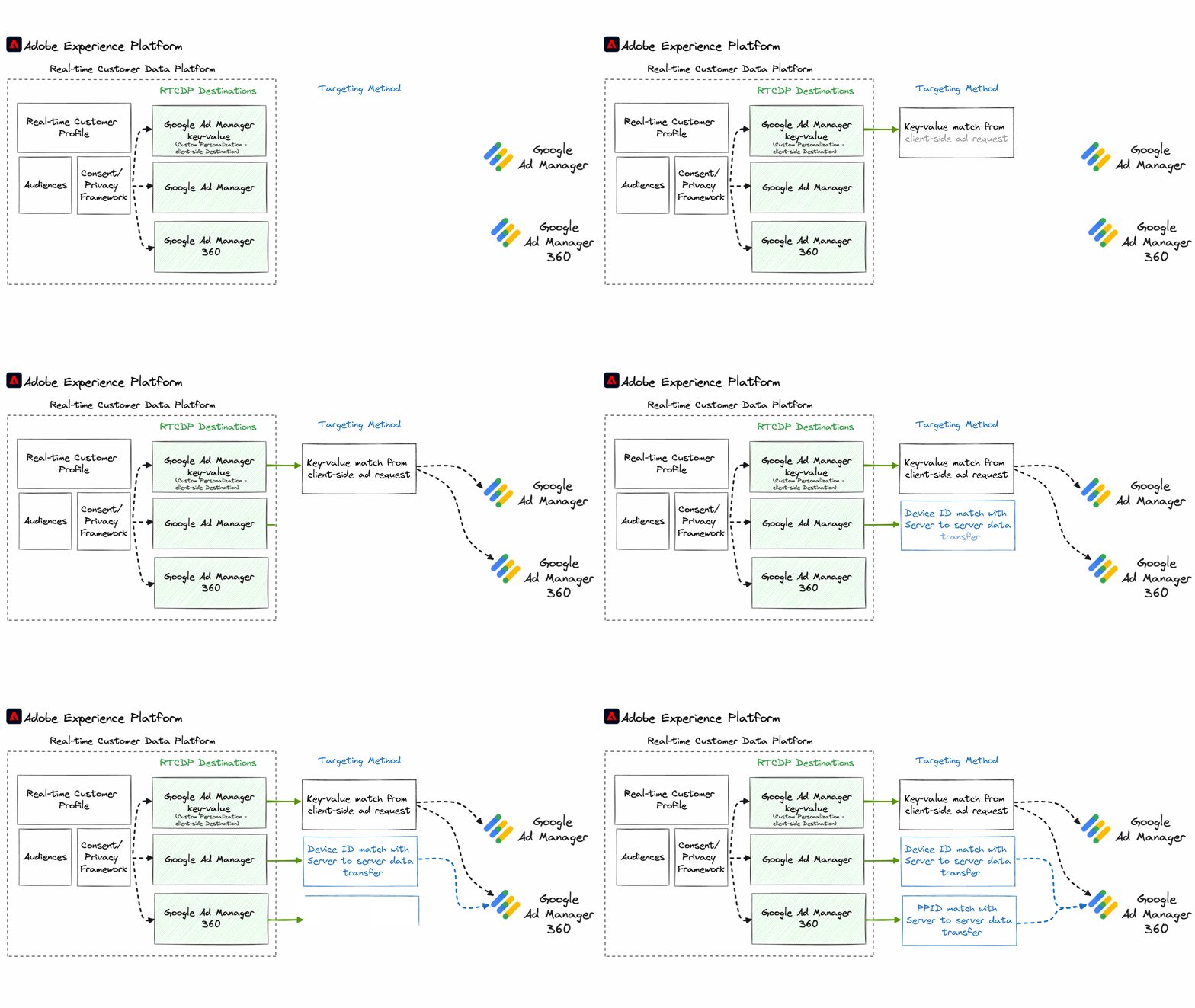
Use cases
As a publisher/retailer, I want to:
- Increase revenue potential by audience packaging so that advertisers pay a premium to reach specific well-defined target audiences.
- Increase relevance by offering more relevant and personalised advertising to users.
- Capitalise on my company's competitive data advantage by making data from other systems addressable such as loyalty data, in-store, survey, etc.
- Enable advertisers to target their consenting users on my digital properties.
Best Practices
- Work closely with the GAM product owner to establish which version of GAM is in use.
- Identify which targeting method is best aligned to the usage in GAM and select the relevant RTCDP Destination(s).
The Three Integration Methods
There are two versions of GAM: Google Ad Manager (standard) and Google Ad Manager 360 (a more premium version). Regardless of the version, Adobe's Real Time CDP (RTCDP) will allow the targeting via different methods.
1. Google Ad Manager key-value
Integrates with both Google Ad Manager & Google Ad Manager 360
This method uses the Custom Personalization Destination similarly to the RTCDP and Google Analytics tutorial. The data is solely transmitted in real-time typically client-side.
Typical steps to integrate:
- In RTCDP, create a Custom Personalization Destination
- Validate a few simple edge segments via the Web SDK or Mobile SDK
- This will be in the form of RTCDP Audience IDs
- Work with the GAM technical team to consume the response
- In GAM, the operational team can target the key value as required based on the RTCDP Audience IDs shared above
BAU: RTCDP and GAM operational team to work in defining Audiences and share the Audience Name to Audience ID mapping.
2. Google Ad Manager
Integrates Google Ad Manager 360 only
This server-to-server integration will transfer both real-time and historical batch data based on several device-based identities:
- Google Cookie ID (browsers allowing third party cookies)
- IDFA (Apple devices)
- GAID (Android devices)
- MAID (Microsoft devices)
- RIDA (Roku devices)
- Amazon Fire TV ID
3. Google Ad Manager 360
Integrates Google Ad Manager 360 only
With the ever-changing landscape with device IDs, PPIDs or Publisher-provided IDs have been used so that publishers can persist user identification in their first-party context.
Conclusion
RTCDP supports both versions of GAM. Whether you are a retailer who is starting out with the base version or an established publisher. The integration options can cover all data ingestion types.
